
The first part of this series introduced app protection policies as a way to keep corporate data contained on personally owned devices that are not enrolled in Intune. It covered how these policies are structured and why Conditional Access with the Require app protection policy grant control is needed to enforce them. It also showed how conditional launch settings, such as a minimum operating system version, determine which devices are allowed to open a protected app.
That last point raises a practical problem. Without knowing which operating system versions are running on the devices in the environment, it is difficult to predict the effect of a policy change. When the minimum OS version is raised, IT admins benefit from knowing upfront which devices, and which users, will be impacted. That insight allows for assessing the impact of the change and inform affected users in advance to take remediating actions before access is warned, blocked or wiped.
The app protection status report in Intune admin center offers only limited monitoring capabilities in this area. Building an overview across the entire environment means exporting the report and filtering and sorting the data manually. That works for an occasional check, but it does not lend itself to extensive reporting.
Microsoft Graph offers a more flexible route. This is where the managed app registration comes into play.
The managedAppRegistrations endpoint
Every time a user signs in to an app that integrates the Intune App SDK with a work account, the app registers itself with the Intune app protection service. That registration is the record Intune uses to deliver app protection policies to the app and to track its status. Microsoft Graph exposes these records, which makes it possible to query them directly.
Managed app registrations are available through the managedAppRegistrations collection under the deviceAppManagement singleton. Each object in this collection is of the resource type managedAppRegistration, which represents the details of an app with management capability used by a member of the organization. The collection returns all app registrations in the tenant.
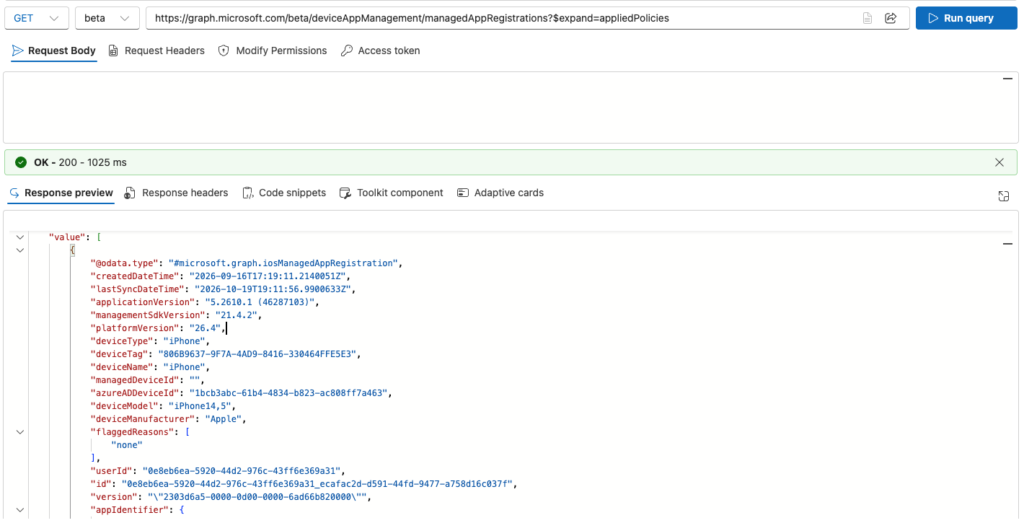
GET https://graph.microsoft.com/beta/deviceAppManagement/managedAppRegistrationsThe endpoint exists in both the v1.0 and beta versions of Microsoft Graph, but this post deliberately uses the beta version. The beta version of the managedAppRegistration resource returns four additional device-related properties that are not available in v1.0: managedDeviceId, azureADDeviceId, deviceModel and deviceManufacturer. These properties make it possible to link an app registration to the device it runs on, both in Intune and in Entra ID, which is essential for the scenarios discussed below.
Reading this data requires the DeviceManagementApps.Read.All permission, either as a delegated permission for interactive use or as an application permission for automated reporting.
The result of the query looks as follows in Graph Explorer.
Retrieving applied policies with $expand
The managedAppRegistration resource on its own describes the app and the device it runs on, but it does not list the app protection policies that apply to it. That information is stored in a relationship called appliedPolicies. Relationships are not returned by default, so they must be requested explicitly with the OData query parameter $expand.
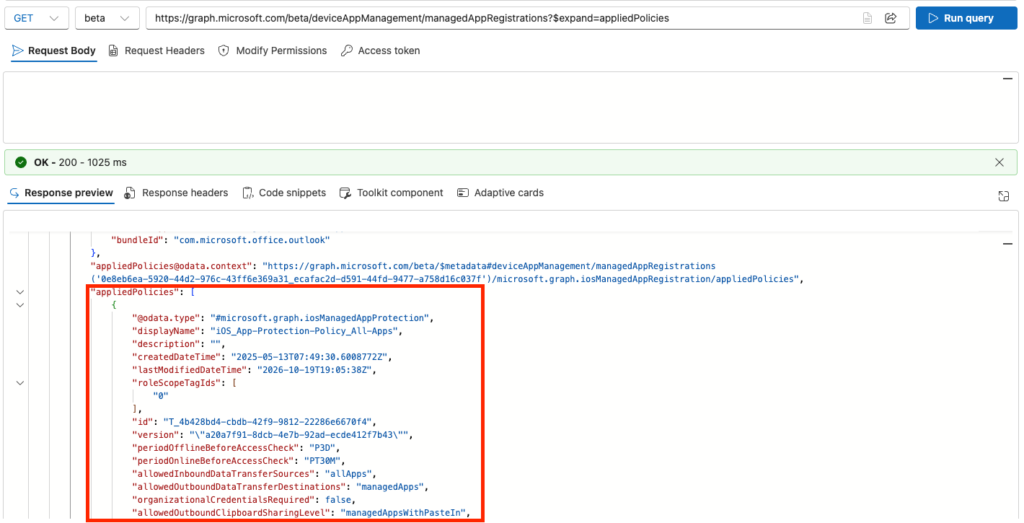
GET https://graph.microsoft.com/beta/deviceAppManagement/managedAppRegistrations?$expand=appliedPoliciesThe appliedPolicies relationship contains the app protection policies that were effectively applied to the app the last time it synchronized with the Intune service. This makes it a reliable way to confirm that a policy has actually reached an app, rather than just being assigned to the user.
After requesting the appliedPolicies relationship, each managed app registration is appended with an array containing the information about the applied app protection policies.
Identification and timestamps
The id property uniquely identifies each app registration. It consists of two GUIDs joined by an underscore. The first GUID is the object ID of the user in Entra ID, and the second is a unique GUID for the app registration itself. Because the user ID is embedded in the identifier, all registrations belonging to a single user share the same prefix.
The createdDateTime property records the date and time the app registration was created, which usually corresponds to the first time the user signed in to the app with a work account. The lastSyncDateTime property records when the app last synchronized with the Intune app protection service. A registration with an old lastSyncDateTime typically points to an app that is no longer in use or has been removed from the device without the registration being cleaned up.
Application details
The appIdentifier property contains the package identifier of the app. It is a complex type whose content depends on the platform. For iOS and iPadOS apps it holds the bundle ID, while for Android apps it holds the package ID. This value allows admins to reliably identify an app, independent of its display name.
The applicationVersion property contains the version of the app that is protected by the app protection policy. This is useful when a policy uses conditional launch settings that require a minimum app version, or when tracking the rollout of an app update across the organization.
The managementSdkVersion property is documented by Microsoft as the app management SDK version. In practice, this is the version of the Intune App SDK that is integrated into the app. The Intune App SDK is the component that allows an app to register with the Intune app protection service and to receive and enforce app protection policies. Without it, an app cannot be targeted by app protection policies at all. Microsoft first-party apps and third-party apps that support app protection policies all embed a version of this SDK. Because some app protection features and conditional launch settings depend on a minimum SDK version, this property helps explain why a particular setting may not behave as expected in an outdated app.
User and device details
The userId property contains the unique GUID of the user to whom the app registration belongs. It corresponds to the object ID of the user in Entra ID and can be used to correlate registrations with user information retrieved from other Graph endpoints.
The deviceName property contains the name given to the device, and the deviceModel property contains the model of the device on which the app is registered. The platformVersion property shows the operating system version the device was running the last time the app synced. Together, these properties provide a quick overview of the device landscape, which is valuable in bring your own device scenarios where the devices themselves are not enrolled in Intune.
The azureADDeviceId property contains the unique device ID with which the device is registered in Entra ID. This post assumes the Conditional Access policy from the first post of this series is in place. That policy uses the grant control that requires an app protection policy, which in turn requires the device to be registered in Entra ID. On iOS and iPadOS this registration is handled by Microsoft Authenticator, and on Android by the Intune Company Portal app acting as broker. As a result, every device that passes the Conditional Access policy has a device object in Entra ID, and the azureADDeviceId property links the app registration to that device object.
The deviceTag property is a tag generated by the Intune App SDK that helps relate apps hosted on the same device. It should not be confused with the azureADDeviceId. Where the azureADDeviceId refers to the device object in Entra ID, the deviceTag is generated by the SDK within the app protection service itself. By grouping registrations on the deviceTag, admins can see which protected apps a user runs side by side on a single device. Microsoft states that the tag is not guaranteed to relate apps in all conditions, so it is best used as an indicator rather than a definitive link.
Putting the data to use
Managed app registrations turn app protection from a configuration that is assumed to work into something that can be verified. By combining the registration properties with the expanded appliedPolicies relationship, IT admins can confirm per user, per app and per device which protection is actually in effect, identify stale registrations and outdated app or SDK versions, and trace a Conditional Access sign-in back to the app registration behind it. For organizations that depend on app protection policies to secure unmanaged devices, this level of insight is what makes the approach auditable.
Geef een reactie